Full Version: Official Signature Requests thread
I have a Sig request...
Could someone please make me an awesome Sig with Umi & her Dragon, Selece in it, please?
Thanks & Greatly Appreciated...
I might have something like that from one of the MKR artbooks, so I'll try to find it for you Umi-san.
QUOTE(Shiidou Hikaru @ Aug 4 2008, 02:06 PM) 
I might have something like that from one of the MKR artbooks, so I'll try to find it for you Umi-san.
Thanks alot, Hikaru-san... Let me know when you get it so I may put it in my Sig...
http://www.henheart.com/rayearth/images/umi4.jpg
It's not formatted for a signature or anything like that, but you're welcome to download it and photoshop it anyway you wish.
It's not formatted for a signature or anything like that, but you're welcome to download it and photoshop it anyway you wish.
QUOTE(Shiidou Hikaru @ Aug 6 2008, 09:52 AM)
http://www.henheart.com/rayearth/images/umi4.jpg
It's not formatted for a signature or anything like that, but you're welcome to download it and photoshop it anyway you wish.
I don't know how to do that... hence why I requested it to be done in here...
Erm, I could make up something for you, but I'd just be winging it. Would that be okay?
QUOTE(Shiidou Hikaru @ Aug 7 2008, 02:36 PM)
Erm, I could make up something for you, but I'd just be winging it. Would that be okay?
What do you mean by that exactly?
QUOTE(Batou @ Aug 7 2008, 05:07 PM)
In other words she'd be slapping something together you might not like because you've given no specifications on what you want beyond having those two characters. It would facilitate the process if you'd be so kind as to specify any desire for text (sizing, style, and color are good to specify in addition to what it says if desired), sizing (making smaller or bigger), cropping (Chopping off), or otherwise.
As that image is rather square you might consider asking Hikaru-san to resize it towards the small side and use more then one image in your sig line. For example:
-----------------


"And being serious all the time isn't good for your health."
"A Giriyagina huh? Because of their power, they never even attempted to understand the pain of the weak. A very self-centered civilization indeed, and that was the reason they were annihilated."
"If a person has the necessities to live and can sleep on the ground listening to the footsteps of the insects, then that is enough."
----------------
I would suggest going to photobucket.com and entering Umi into the search line to pull up images. As of right now MKR pictures don't show up until the 2nd page, but there are quite a few and for the most part if pictures exist worth bothering with they'll be in someone's photobucket archive. For instance You might prefer an image with a little more energy then Hikaru-san's pick there.
Photobucket can do cropping and resizing as part of the account, but as it leads to image degradation even when just resizing the image down I would not suggest using photobucket's built in utilities. Seems as how people here do have access to appropriate software I'd suggest selecting, linking by copying the IMG code photobucket offering via clicking to select Ctrl-C and Ctrl-V in the post making text box, and specifying how you'd like them modified.
Don't get frustrated if you have to go back and forth a few times to get it just right, that's just life.

This is my own early attempt at such things using inferior software aka Microsoft Photo Editor from the 98 Plus pack. If you can't get access to software with good resizing algorithms then you can still do something like this through cropping, defining the image size, and copy and paste tricks. I have a couple wallpapers I created with the same concept and significantly more images then this basic sig. If you want a collage of layered images, I can do that but I'd ask you pick out what you want already in the appropriate size range or pick an image of lower defition quality then my avatar which thus will not have resizing degradation be quite so obvious.
To illustrate what can happen:
 vs
vs 
Note how the second image is like the first viewed through imperfect glass? That's part of why there's expensive software related to these things.
Alright, thanks for the advice...
@ Hikaru-San: Whatever the size limit for sigs here is fine with me or smaller... For background colors, I'd go with different BLUE colors...
and about saying/ letterings... give me some ideas you would think best to put in the sig with those 2 characters...
Here's something I made up real quick -
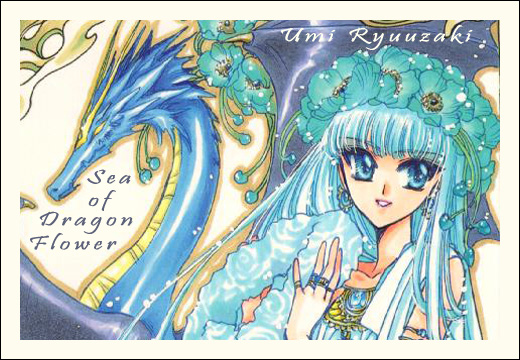
Please let me know if it's okay.
Please let me know if it's okay.
QUOTE(Shiidou Hikaru @ Aug 8 2008, 02:18 PM)
Here's something I made up real quick -
Please let me know if it's okay.
Yea, it's fine... does it meet the Sig size and what not for this forum though?
So, I don't have to ask you to resize it or something again?
Also, is there any Animated gifs for my avatar that have both Umi & Selece in it?
If so, I'd like to have one please, if you don't mind...
Thanks and greatly appreciated...
This is a "lo-fi" version of our main content. To view the full version with more information, formatting and images, please click here.